
Technical Analysis of CAD/CAM Systems in the Context of Pattern Engineering, Grading, Nesting and Data Integration
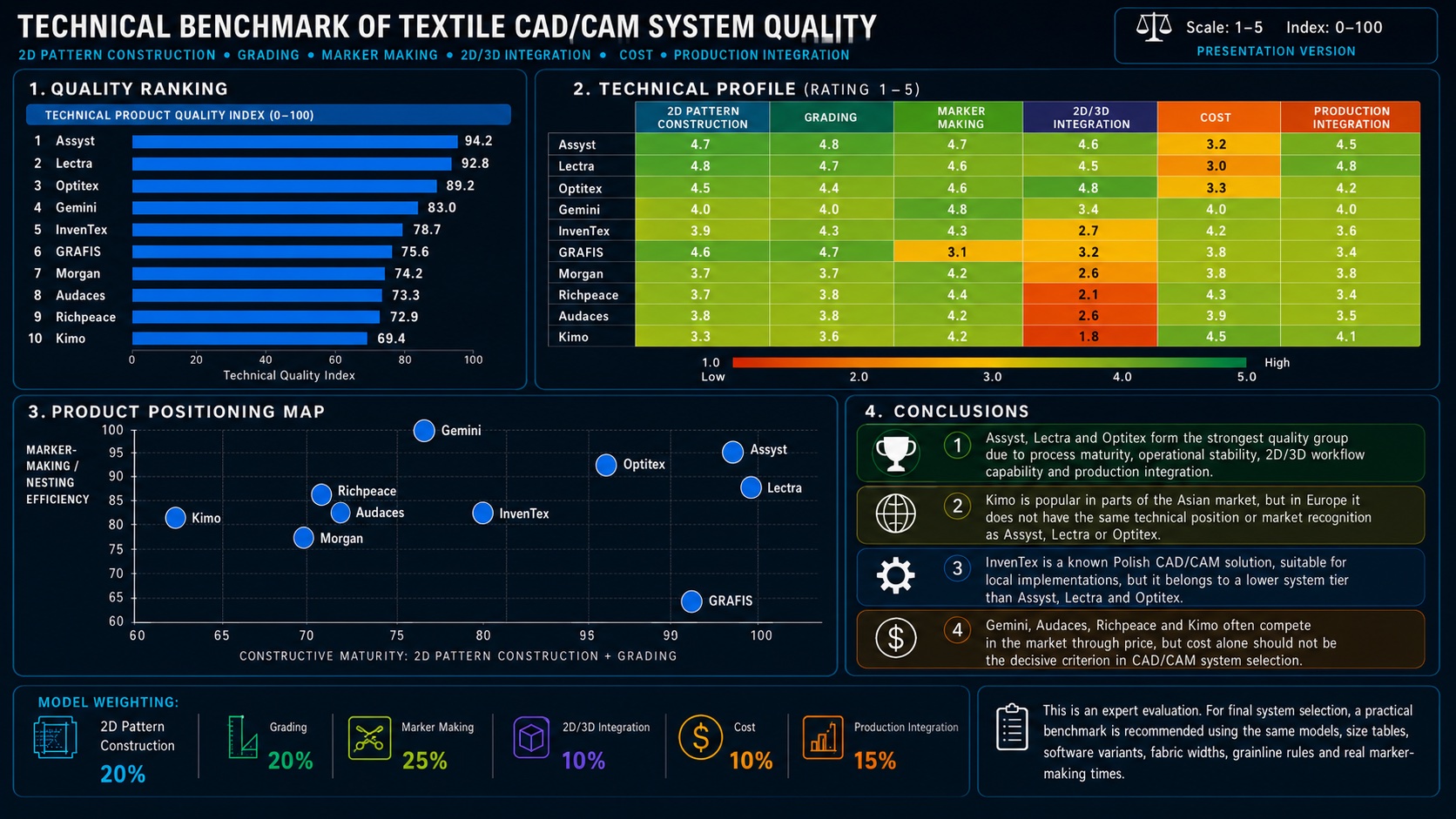
A comparison of CAD/CAM systems for the apparel industry should not be limited to the evaluation
of
pattern-making functions alone. In an industrial environment, equally important factors include
installation architecture, licensing model, compatibility with data exchange formats, quality of
AAMA/ASTM file import and export, the possibility of editing imported data, and integration with
the
cutting room, plotters, cutters, PLM and ERP systems.
In practice, a CAD/CAM system is a component of the production infrastructure, not merely a tool
for
the pattern maker. Its real value therefore depends on whether it can reliably transfer pattern,
grading and cutting data between the design, technical and production departments.
2D Pattern Construction and Grading as the Core of the System
The highest-rated systems, such as Assyst, Lectra and Optitex, stand out for their stability in
2D
pattern construction, grading and pattern geometry control. In a professional CAD environment,
the
key issue is not only the ability to draft a pattern, but also to maintain correct construction
dependencies after each modification.
The system should allow precise work with base points, construction lines, Bézier curves, darts,
assembly points, notches, drill holes, seam allowances and internal lines. Control of seam
lengths,
reference point compatibility and symmetry between pattern pieces is also essential.
In grading, the critical factors are grading rules assigned to specific construction points, the
possibility of editing increments on the X/Y axes, size table handling, base size control and
verification of pattern proportions across the full size range. Systems that are weaker in this
area
may handle a single size correctly but generate errors when exporting a complete size set.
AAMA/ASTM Import and Export as a Critical Implementation Parameter
One of the most important technical criteria is support for data exchange formats, primarily
DXF-AAMA and DXF-ASTM. In practice, the simple statement “AAMA/ASTM supported” is not
sufficient.
What matters is how the system interprets the data after import and whether it allows further
editing without losing technological information.
During import, it is necessary to check whether the system correctly reads:
- pattern contours,
- internal lines,
- seam allowances,
- notches,
- assembly points,
- grading points,
- base size,
- pattern piece names,
- grainline direction,
- piece annotations,
- material information,
- model variants,
- grading rules.
The most common problems occur during the conversion of notches, drill holes, internal lines,
piece
descriptions and grading data. Some systems import the geometry correctly but treat it as a
“dead
outline”, without full editability of points, rules and technological attributes. In such a
case,
the file can be opened, but further processing requires manual reconstruction.
Export is equally important. A professional system should allow AAMA/ASTM export configuration:
selection of layers, naming conventions, units, point encoding, line types, notch
representation,
size range and file structure. The ability to map export data is particularly important when a
company cooperates with different suppliers, sewing factories, cutting rooms or subcontractors
using
other CAD/CAM systems.
Other Formats and Communication with Production
In addition to AAMA/ASTM, other formats are also important: various DXF variants, HPGL/PLT for
plotters, ISO cut files for cutters, PDF for documentation, AI or EPS for graphic communication,
CSV/XML for tabular data, and the native formats of individual CAD/CAM software vendors.
In a production environment, the ability to export data to the cutting room is particularly
important. A production file must contain not only geometry but also information about lay
direction, material parameters, fabric width, spacing tolerances between pieces, rotation
restrictions, size variants and quantities in the marker. Incorrect interpretation of these data
may
result in faulty cutting, material loss or the need for manual marker correction.
For this reason, system evaluation should include not only model import, but the complete
workflow:
pattern construction → grading → marker making → export to plotter/cutter → reading the file on
the
production device.
Installation Architecture: Server, Network Licences and Local Dongles
A very important aspect of implementation is the installation and licensing model. Some CAD/CAM
systems can operate in a server-based architecture, with a central model database, shared
libraries,
version control and network licensing. Other solutions more often function as local
installations
assigned to a specific workstation or protected by a separate hardware or software key.
A server-based model is beneficial in manufacturing companies where several departments work on
the
same model: pattern construction, technology, production preparation and cutting room.
Centralised
data reduce the risk of working on an outdated version of a pattern, allow user access control
and
facilitate the creation of a shared database of models, fabrics, size tables and grading rules.
Local installations or licences based on separate keys may be simpler to implement, but in
larger
organisations they create the risk of data fragmentation. Typical problems include file
duplication,
lack of a unified repository, more difficult version control and dependency on a specific
workstation or physical licence key.
In practice, the choice of architecture should depend on the scale of the company. For a
one-person
pattern-making studio, a local licence may be sufficient. For a production plant working with
many
collections, size ranges and subcontractors, a network or server-based architecture is safer.
Nesting, Marker Making and Fabric Consumption Optimisation
The marker-making area has a direct impact on product cost. The system should support automatic
and
semi-automatic nesting, directional restrictions, pile or nap fabrics, pattern repeat, stripes,
checks, rotation limitations, forbidden zones, spacing tolerances between pieces and different
usable fabric widths.
In the analysis, Gemini, Assyst, Lectra, Optitex and Audaces perform very well in this area.
Gemini
in particular demonstrates high efficiency in marker making, which may be important for
companies
that prioritise reducing fabric waste.
However, nesting efficiency should not be assessed only by the percentage of material
utilisation.
It is also necessary to check marker generation time, the possibility of manual marker
correction,
compliance with cutting-room technological constraints, quality of export to cutters and data
integrity after re-import.
2D/3D Integration and Material Parameters
Systems such as Optitex, Assyst and Lectra achieve high scores in 2D/3D integration.
Technically,
this means the ability to link a flat pattern with a virtual prototype, assess fit on an avatar,
control tension maps, analyse garment balance, volume and seam length relationships.
It should be emphasised, however, that the quality of 3D simulation depends not only on the
software, but also on correctly entered mechanical fabric parameters. Fabric weight, stretch in
warp
and weft direction, bending stiffness, thickness, friction, elasticity and deformation behaviour
directly affect the reliability of the virtual sample.
A 3D system without a properly defined material database may produce a visually attractive
result,
but not necessarily a reliable technological assessment.
Implementation Conclusions
Assyst, Lectra and Optitex form the group of the most advanced systems for industrial
environments
where stable 2D construction, full grading, good 2D/3D integration, advanced nesting and
communication with production are required.
Gemini is particularly interesting in the area of marker optimisation. GRAFIS remains a strong
pattern construction and grading tool, although it requires detailed evaluation in terms of
production integration and 3D workflow. Audaces can be considered an intermediate solution,
useful
where good functionality is needed with a lower implementation threshold.
Lower-cost systems such as Kimo, Richpeace, Morgan and InvenTex may be sufficient for smaller
companies or simpler production processes, but before purchase it is essential to test AAMA/ASTM
import and export, grading editability, marker quality and compatibility with existing plotters
and
cutters.
The final choice of a CAD/CAM system should be preceded by a practical benchmark. The test
should
include importing an AAMA/ASTM file with a full size range, editing pattern pieces, modifying
grading rules, preparing a marker, exporting the marker and reading the file on the target
production device. Only this process shows whether the system is truly compatible with the
company’s
technology or merely displays the data correctly on screen.
This analysis is based on my practical experience with apparel CAD/CAM workflows, as well as on
publicly available information regarding the capabilities of the compared systems. The systems
were
assessed according to key technical criteria: 2D pattern construction, grading, marker making
and
nesting efficiency, 2D/3D integration, production connectivity, licensing architecture, file
import/export compatibility and overall implementation flexibility. CAD/CAM systems are
continuously
developed, updated and expanded with new functions, which means that their technical evaluation
may
change over time depending on software versions, implementation models and vendor improvements.
Therefore, the final ranking should be treated as an example of a technical evaluation framework
rather than an absolute or permanent market classification.